
How to Make Your Own Meme From a Photo
Learn how to make your own meme from a photo with simple steps, funny caption tips, and AI meme generator ideas that help you create shareable memes fast.

If you want to make your own meme, you do not need fancy editing skills or a huge social media following. What you really need is a photo with a clear mood, a simple idea, and a caption that helps people recognize the joke in seconds.
That is why photo-based memes work so well. A selfie, pet photo, screenshot, or random camera-roll moment can feel fresher than an old template because it looks personal and original. When you make your own meme from a real photo, the result often feels more relatable, more surprising, and more shareable.
The main idea is simple: a meme works when the image and the caption support each other. The photo grabs attention. The text gives it meaning. If those two pieces click together quickly, you already have the foundation of a strong meme.
How to Make a Meme With Your Own Picture Step by Step
Choose a photo that already says something
The easiest way to make a good meme is to start with an image that already carries emotion. A confused face, a tired expression, a dramatic pet, an awkward group photo, or a screenshot of a relatable moment all give you something to build on.
If you want to make a meme with your own picture, avoid images that are too crowded or visually messy. A clear subject usually works better than a busy background full of details. The best meme photos often show one obvious feeling: stress, pride, panic, boredom, excitement, or total confusion.
Before you add any text, stop and ask: what does this image already communicate? That question matters because the strongest memes do not fight the photo. They work with it.
Find one clear joke
Once you have the image, the next step is to connect it to a familiar situation. The simplest route is to tie the photo to everyday life: opening your inbox, acting productive, surviving Monday, pretending to understand something technical, or realizing your weekend is over.
A meme usually gets stronger when it focuses on one idea only. It does not need a backstory. It does not need explanation. It just needs one recognizable moment. That is the easiest way to make your own meme without overcomplicating it.
A reliable structure looks like this:
- Top text: the setup
- Bottom text: the reaction or punchline
Example:
- Top: “Me joining the meeting late”
- Bottom: “Trying to act like I know what is going on”
This works because the structure is fast to read and easy to understand.
Keep the caption short
One of the biggest mistakes beginners make is writing too much. If you make a meme with your own photo and the text turns into a paragraph, the joke slows down. Memes are supposed to land quickly.
Try to keep your caption:
- Short
- Clear
- Readable on mobile
- Focused on one emotion or idea
In many cases, one line is enough. Sometimes two short lines are all you need. If the image already looks funny, your caption should guide the viewer, not explain every part of the joke.
Let AI help when the wording feels stuck
Sometimes the image is easy to choose, but the text is hard to write. That is where AI can save time. You can start with a prompt and get a meme idea quickly.
This can be especially helpful when you know the topic but not the exact wording. For example, you might begin with prompts like:
- “One does not simply understand recursion.”
- “Me trying to stay focused for more than 5 minutes.”
- “When the WiFi comes back after a full hour.”
- “POV: you open your inbox on Monday morning.”
From there, AI can generate a first version that you can polish. That makes it easier to make your own meme faster while still keeping the final joke aligned with your own tone.
Make the final version easy to scan
The final step is not just adding words. It is making sure the whole meme is readable in a second or two. Use large text, strong contrast, and enough empty space so the caption does not cover the best part of the image.
A good rule: if someone sees your meme while scrolling fast on a phone, they should still understand the joke. If they have to zoom in or reread it, simplify it.
Tips to Make Your Meme Funny and Shareable
Relatability beats complexity
A lot of people think a meme has to be extra clever to work. Most of the time, it just has to feel familiar. If someone looks at it and thinks, “That is exactly me,” you are already close to a shareable meme.
That is why topics like procrastination, awkward social moments, school stress, work stress, online shopping, deadlines, and group chats show up in so many popular memes. They are common experiences. When you make meme from image, recognition matters more than trying too hard to sound brilliant.
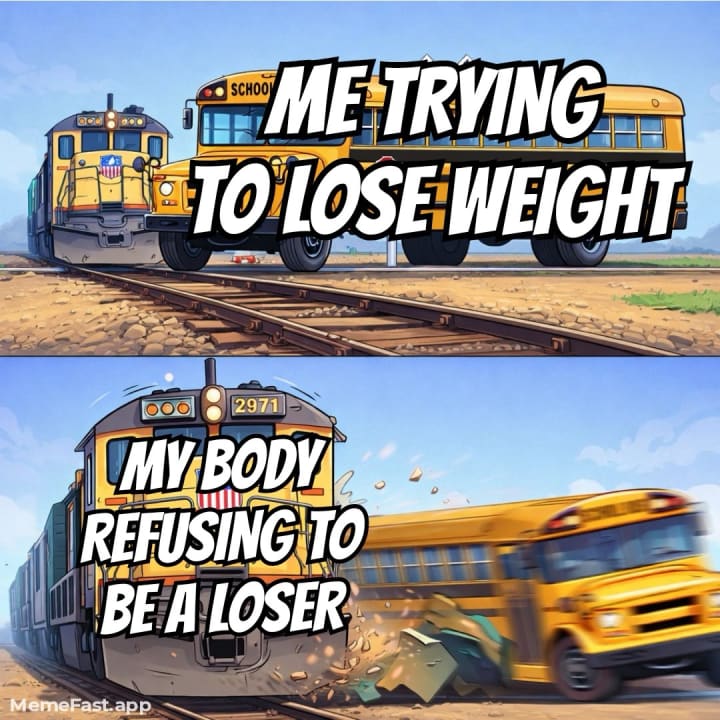
Photo of example funny meme: Relatability is key to virality. This meme uses a popular “expectation vs. reality” format to make light of a common struggle.
Let the image carry part of the joke
A meme is not just text pasted on a picture. The picture should do some of the work too. If the image already looks chaotic, exhausted, proud, or confused, you do not need to explain everything with the caption.
This is one reason custom memes often feel stronger than reused templates. When you make a meme using your own picture, the visual feels newer. People have not already seen it a hundred times, so the joke can feel more original even if the idea is simple.
Match the caption to the emotion
Strong memes feel natural because the caption matches the mood of the image. If the photo looks stressed, use a stress-based joke. If it looks smug, go with overconfidence. If it looks confused, lean into confusion.
This may sound obvious, but it improves results fast. A lot of weak memes happen because the caption and image feel disconnected. If you match the wording to the visual emotion, the meme becomes easier to understand and much funnier.
Test different versions
Small edits matter. Sometimes changing one word improves the joke. Sometimes a shorter version is better. Sometimes a more specific version is funnier.
If you want to make your own meme for social media, try writing two or three caption options before posting. Read them out loud. The one that sounds the cleanest often works best. Meme humor depends a lot on rhythm, so even tiny changes can make the final version sharper.
Think about the phone screen first
Most memes are viewed on mobile, not on a big desktop monitor. That means your text has to be big enough, your crop has to be clean, and the image cannot be overloaded with detail.
When in doubt:
- Use fewer words
- Make the text larger
- Crop tighter
- Leave more breathing room
That makes the meme easier to read and better suited for platforms like Instagram, TikTok, X, Reddit, and messaging apps.
Conclusion
If you want to make your own meme from a photo, the theory is actually pretty simple. Start with a strong image. Find one relatable idea. Keep the caption short. Make sure the joke lands fast.
Whether you want to make a meme with your own picture, build a reaction meme from a selfie, or use AI to speed up your caption writing, the goal stays the same: create something people instantly understand and want to share.
If you want the complete version, you can read it here: How to Make Your Own Meme From a Photo.
About the Creator
John
John explores the best free apps, AI tools, and creative platforms so you don’t have to. He breaks down what works. If you love discovering powerful tools and smart comparisons, you’re in the right place.
Two Grumpy Old Men Solve the Problem
Marty and Steve were two grumpy old men who lived together. They had known each other for years. Marty had been a bachelor all his life. Steve said it was because no one could stand to ever live with him. Marty’s standard reply was “Well, you are, so what sort of a moron does that make you!”
By Calvin London14 days ago in Humor
A Transparent Look at Vocal Challenges and Top Stories
Almost three years ago, we shared a resource article that served as a place for people to suggest new challenge prompts. We thought it would be a good idea to refresh that thread, and take the opportunity to answer a few common questions about top stories, how challenges are judged and how submissions are reviewed.
By Vocal Curation Team5 days ago in Resources


Comments